











































Touchscreen technology
Increasingly present in our lives and in the most varied applications, embedded in phones, access systems, medical monitoring equipment and industrial HMIs, touchscreens are everywhere. As a component, they now have an extremely wide range of applications: if a product has a display or keyboard, a designer somewhere is probably considering how to also implement touchscreen technology.
As with any technology, there are many implementation approaches, performance needs and technical considerations to make when designing a touchscreen monitor.
Knowing what is needed is an important first step in designing a touchscreen product. A capacitive touchscreen is, in fact, a set of parts that together contribute to ensuring the performance required for correct operation.
The three most common types of touchscreen
- Resistive touch screens are used in high-use applications and represent the most economical touchscreen implementation. They react to pressure – they can be activated with a finger, a gloved hand, a stylus or another object – and are immune to water.
- Surface capacitive touch screens provide a much clearer display compared to the plastic covering typically used in a resistive touchscreen. In a surface capacitive display, sensors at the four corners of the display detect changes in capacitance caused by touch. These touchscreens can only be activated with a finger or another conductive object.
- Projected capacitive touch screens are the latest development on the market. They offer even greater optical clarity and, compared to surface capacitive screens, do not require position calibration and have much higher positional accuracy. They can also detect multiple touches at the same time.
The components of a touchscreen display
Let’s look at the various components that make up a touch display “system”:
- Front panel or Cover Lens
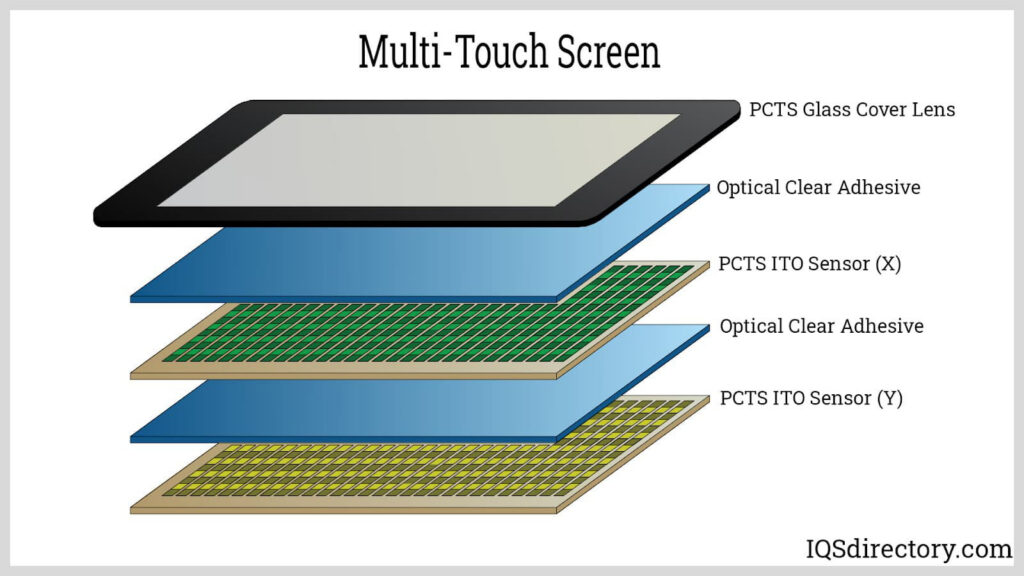
The front panel (also called the Cover Lens) is the outermost part of the final product. In some products, this will include a transparent protective layer to create a barrier against weather and moisture and to resist scratches and vandalism that could affect the display’s touch sensors (see point 3). In other cases, the outermost panel simply covers the edges of the underlying touch sensor and, in this case, is purely decorative.
The possibility of using different materials (from plastic to glass) and the different methods of assembling the front panel with the touch sensor (from Air Bonding to Optical Bonding, which, through the use of special adhesives, ensures strong adhesion, high transparency and UV ray blocking of >99%), guarantee high performance even in extreme working conditions.
- Touch controller
The touch controller is a microcontroller-based chip located between the touch sensor and the embedded system controller. It can be placed on a controller board inside the system or on a flexible printed circuit (FPC) attached to the glass touch sensor. This chip takes information from the touch sensor and translates it into information understandable to the system controller.
There are various manufacturers on the market, with different performance levels and costs.

- Touch sensor
A touchscreen “sensor” is a transparent glass panel with a touch-sensitive surface placed over a TFT display so that the panel’s touch area covers the display’s visible area.
Today, numerous touch sensor technologies are available on the market, each using a different method to detect touch input. Fundamentally, all these technologies use an electric current flowing through the panel which, upon touch, causes a change in voltage or signal that is detected by the touch controller to determine the position of the touch on the screen.
- Display (TFT, LCD or other type)
Most touchscreen systems work with any type of display.
The display to be paired with a touch panel should be chosen for the same reasons as in a traditional system: resolution, contrast, brightness, response speed, power consumption and cost.
An important consideration for a touchscreen, however, is the level of electrical emission. Since touch sensor technology relies on small electrical changes when the panel is touched, it can be difficult to choose a display that emits a lot of electrical noise, which is why relying on experts can prove very useful.
- Control software
The touchscreen controller software can be factory-installed or offered as additional software that can be installed/updated directly by the customer.
It allows the touchscreen and the system controller to work together and tells the product’s operating system how to interpret the touch event information sent by the
controller. In a PC-style application, most touchscreen drivers work like a PC mouse, so touching the screen is similar to clicking the mouse at the same position on the screen. In embedded systems, the embedded controller driver must compare the information shown on the screen with the position of the touch received.
How touchscreens work
Focusing on Capacitive Touch Screens, currently the most widely used, they have a strong electrical component. Projected capacitive touchscreens have no moving parts; the only things standing between the display and the user are the ITO (indium tin oxide, a transparent conductor) and the glass, which have optical clarity close to 100%. The capacitance sensing hardware consists of a top glass layer, followed by a series of X sensors, an insulating layer, then a series of Y sensors on a glass substrate. The panel will have one wire for each X and Y sensor, so, for example, a 5 x 6 panel will have 11 connections while a 10 x 14 panel will have 24 connections. When a finger or another conductive object approaches the screen, a capacitor is created between the sensors and the finger, thus changing the capacitance. This capacitor is small compared to the others in the system (about 0.5 pF out of 20 pF), but it is easily measurable.
A series of projected capacitive sensors is designed so that a finger interacts with more than one X sensor and more than one Y sensor at the same time, which allows the software to accurately determine the position of the finger with great precision through interpolation.
Because projected capacitive panels have multiple sensors, they can detect multiple fingers at the same time, something impossible with other technologies. In fact, it has been shown that projected capacitance can detect up to ten fingers simultaneously, and this enables exciting new applications, including control of complex processes via user-defined gestures through software.
Without a doubt, touchscreens have begun to define a new user interface and an industrial design standard that is being adopted in multiple applications, from heart rate monitors to industrial HMIs, access control systems, and vending machines.
Beyond the simple appearance, however, touchscreens offer an unprecedented level of security against tampering, resistance to weather, durability against wear, and enable use in new markets thanks to unique features such as multi-touch touchscreens, the ability to be used even with thick gloves that would normally inhibit changes in capacitance, and in the presence of water droplets (think, for example, of outdoor applications where the display and its touchscreen are exposed to weather conditions). With the introduction of touchscreens into so many types of products, it becomes essential for designers to understand the technology ecosystem and the availability of the technology.
CONSYSTEM’s touch screen monitor offering
CONSYSTEM, a long-standing electronic components distributor, offers numerous touch displays designed and manufactured by suppliers such as Powertip and TDO, which are characterized by high product reliability, design capability and ad hoc customizations based on customer needs. These devices are used in numerous sectors such as: industrial automation, home automation, medical, and, in general, all applications that require complex display systems.
Among the highlights of the CONSYSTEM offering is the UART display with dedicated GUI (Graphic User Interface) by Powertip, designed to facilitate the development of HMI interfaces while significantly reducing time-to-market. The device integrates an embedded TFT touchscreen display, from 3.5” to 7” depending on needs, making it a perfect “ready-to-go” solution. Various interfaces are available (HDMI, MIPI, serial RS232, Parallel TTL RGB) and the operating temperature ranges from -40°C to +80°C. The range of applications is vast: Industrial, Medical, Home Appliance, Smart Home, etc.

Thanks to our technical specialist for the display field, CONSYSTEM guides the customer in choosing the touch display best suited to their specific needs, supporting them throughout the entire commercial cycle: from design-in to after-sales.
Article published in the magazine Selezione di Elettronica in April 2024